
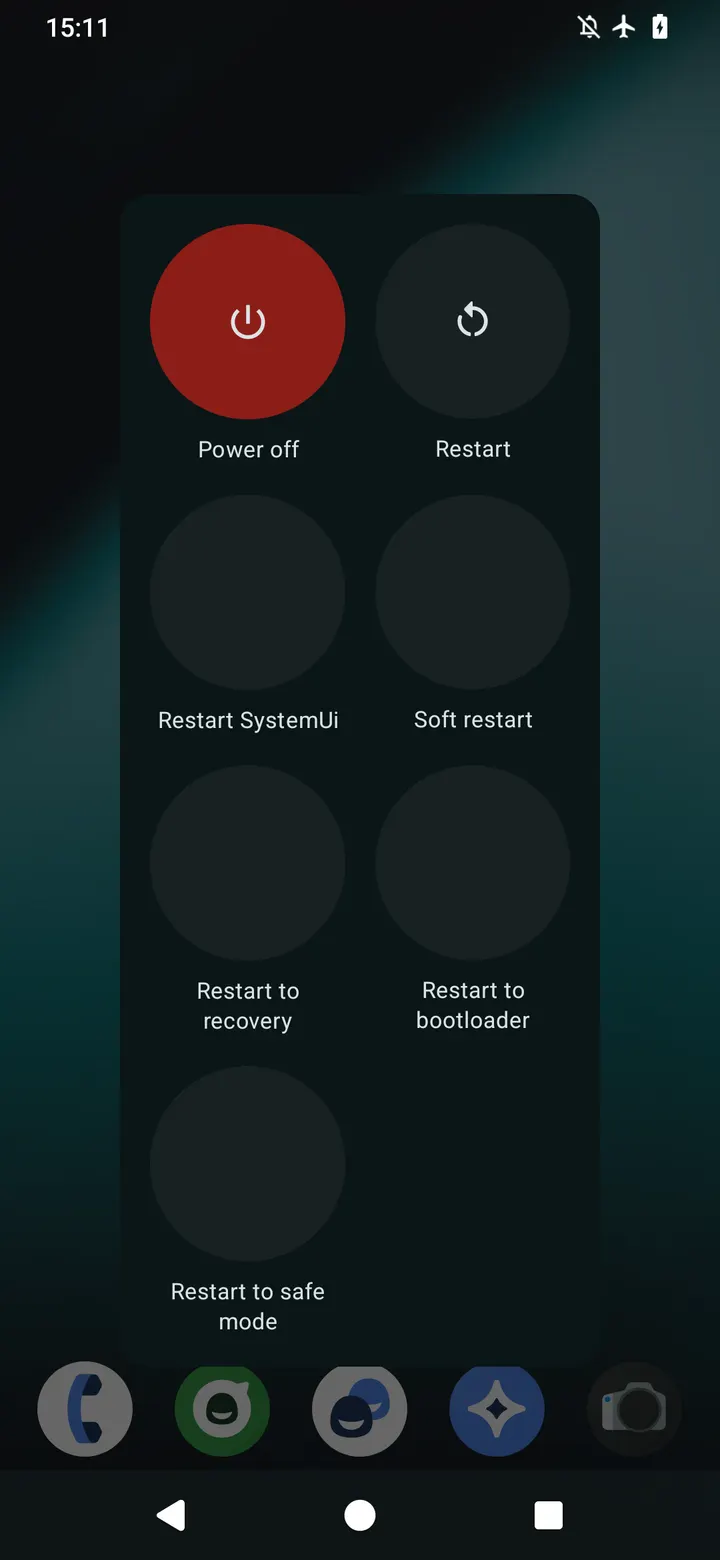
Your custom ROM has no reboot-to-recovery entry in the power menu, and you would rather not type commands into a terminal. Simple Reboot (root) puts those options on screen as shortcuts. It is a small open-source utility by Francisco Franco, and it needs root access to work.
Who needs a reboot shortcut app on a rooted phone
This app fits people who run rooted devices and switch between system, recovery and bootloader often. If your ROM lacks those entries, the app fills the gap without adb or a command line. It also suits anyone who flashes files and wants a quick way back into fastboot.
The category is root tools, and the app requires root. Without it, the shortcuts cannot do their job.
Recovery, bootloader, soft reboot and Safe Mode in practice
The core job is rebooting into different states: a normal restart, recovery, and the bootloader for fastboot use. Version 9.0 also includes a soft reboot and a Safe Mode reboot. A separate option restarts SystemUI without rebooting the whole device.
The app weighs 1.9 MB and runs on Android 5.0 or newer.
Rating, age rating and what the app leaves out
Simple Reboot first appeared on January 28, 2015, and the latest update is dated April 6, 2024. That is a long run for a utility that weighs only 1.9 MB.
The app is free, with no ads and no in-app purchases. Magisk Module Manager is a possible alternative, though it does a different job.
Simple Reboot (root) pros and cons
Pros
- Adds recovery and bootloader reboot shortcuts for ROMs that lack them
- Includes soft reboot, Safe Mode reboot and a SystemUI restart
- Free, no ads, no in-app purchases
- Only 1.9 MB and runs on Android 5.0 or newer
- Source code is public under Apache-2.0
Cons
- Needs root access, so it is useless on unrooted phones
- Google Play rating is a modest 3.8
- Version 9.0 changes are not documented
Is Simple Reboot (root) safe?
The APK is stored unmodified, and its SHA-256 is 96b24bb2528036dd7f91cebf35f371c72c97178e215ee641cb0fa1165fee6b54, so you can compare your download against it. The source code is on GitHub under the Apache-2.0 license, and the developer is Francisco Franco. He says the app has no data collection and no shady permissions. Since it needs root, grant that access only if you trust the code.
How to install Simple Reboot (root)
- Download the APK with the button on this page and wait for it to finish.
- Compare the file with the SHA-256 checksum shown here if you want to confirm it arrived intact.
- Open the file on your phone and allow installs from this source when Android asks.
- Finish the install, then open Simple Reboot (root) from your app drawer.


